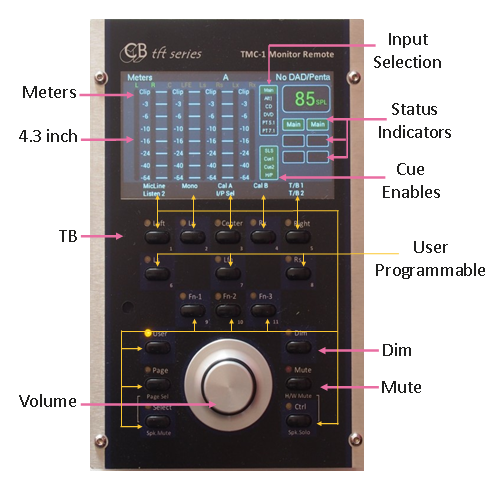
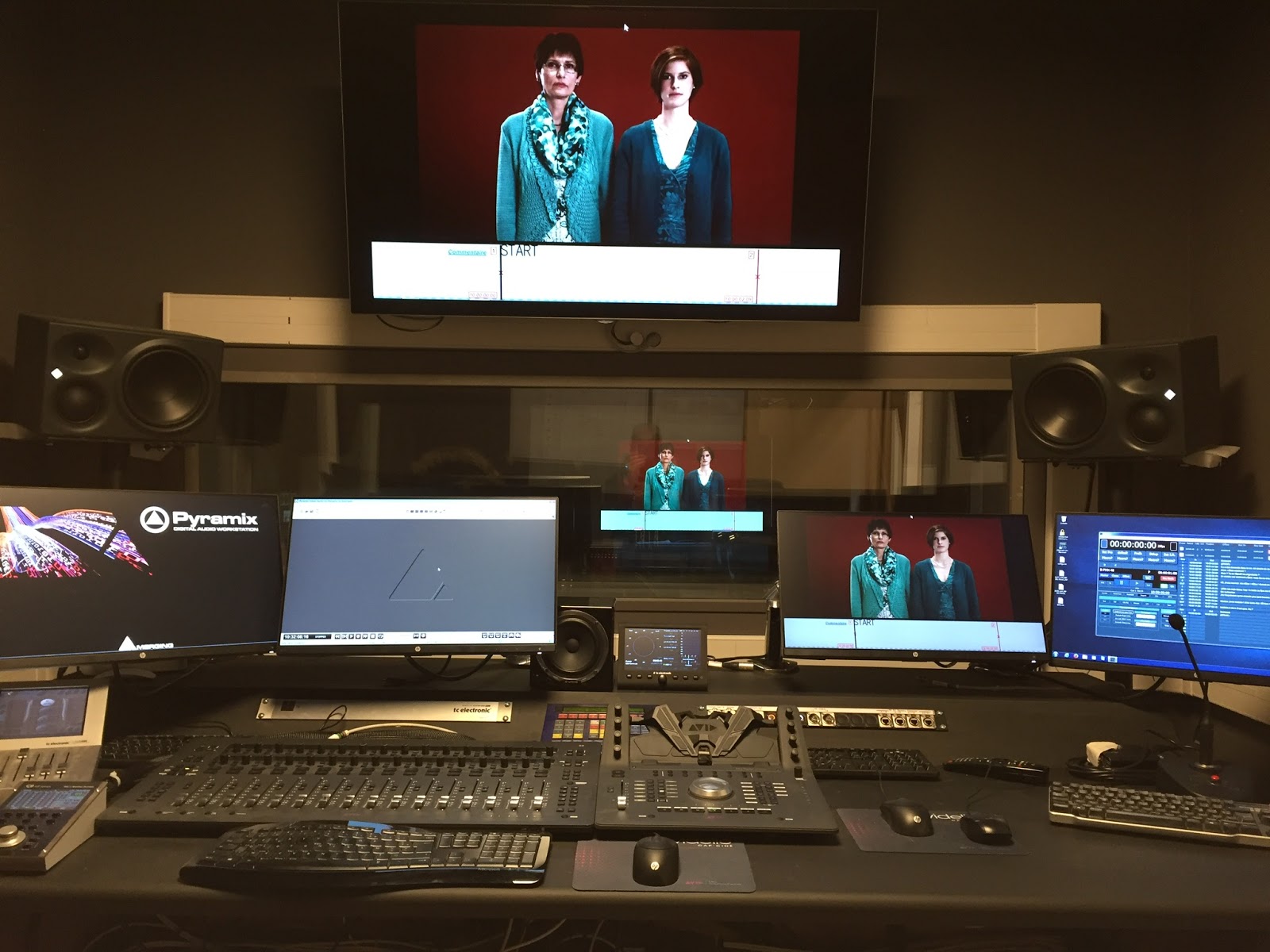
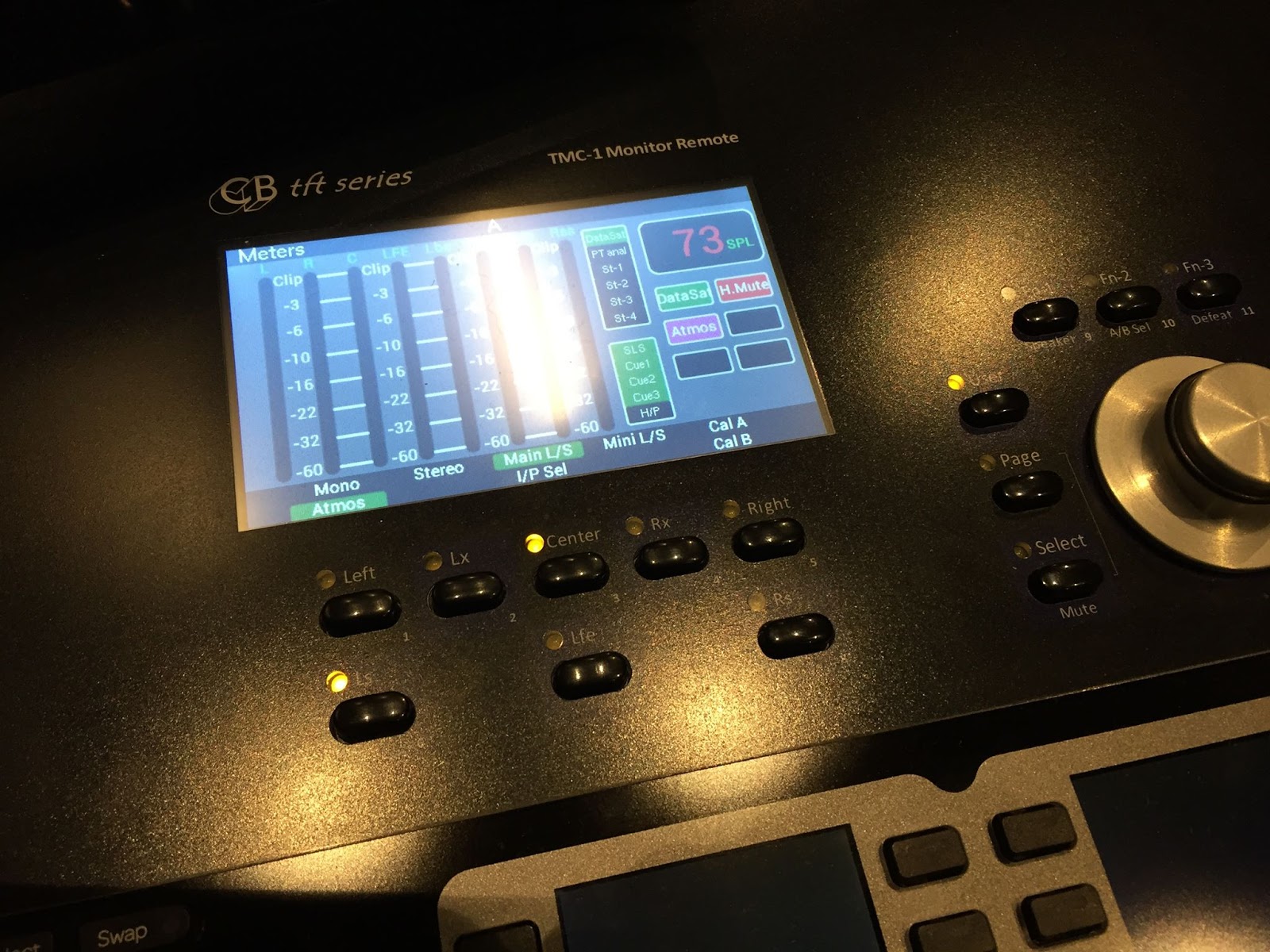
After installing a TMC-1 XMon Monitor Controller Remote in their colour grading suite in September 2016 Polyson Post Production decided that they loved it so much they decided to upgrade the monitoring on 3 Avid S6 consoles with the TMC-1 S6 Monitor Controller XMon in July 2017.
Post Production Solutions Specialists in Studio Monitor Controllers, Timecode, Biphase, Serial Control and Remote Control.
AVID and Dolby Labs recommended post production monitoring controllers and interfaces.
Thursday, 28 September 2017
Wednesday, 2 August 2017
Open Sound Control for the TMC-1
After publishing my initial idea's for a tablet interface to the
TMC-1 using HTML, one of our users (James Chappell) suggested that I
look at TouchOSC. After investigating OSC I have shelved the HTML
interface and spent the past week developing an OSC interface.
The main advantage of using OSC is that users can design their own interfaces incorporating only the functions that they need, simplifying the user interface. Multiple pages allow for different applications. OSC applications are available for IOS and Android I have not found any for OSx or Windows.
You can see the two test interfaces I designed below The first includes input selection (user keys), metering, output level control and Level indication. It has been designed fot the TMC-1-Penta which can select between 8 inputs. I was impressed with the meter performance using an old Android tablet. A nice touch is the battery status indicator
The second screen below is a cue source selection page complete with level controls and enable keys, This design may be used as a template and unused input and output controls deleted.
I have now finished two more test pages and I will be releasing this software for the TMC-1-Penta, -XMon and -AMon later this week - I also found how to label the tabs!
For the TMC-1-Penta only - Note :the latest Penta software has 32 Palette entries instead of 16.
The images above were taken from the design s/w, the Tablet and my phone look the same or better.
TMC-1 with tablet in my workshop - designs for the 3d printed cradle are also available.
Initially I intended to use OSC-Midi commands but then decided to use direct OSC commands to control the TMC-1, if the controls are named correctly they will connect directly with the TMC-1. The user can define the label names but it is recommended that the TMC-1 updates User Key labels as they can be dependent on the interface (Penta, XMon, A-Mon) and can change when the s/w is updated. All controls are updated when the page is changed, the interface is bidirectional and updated in real time. The meter block uses a multi-fader graphic.
I am currently controlling the TMC-1 from a tablet and phone simultaneously. The first command on either will update the display tothe current TMC-1 status. The [TMC-1] key is used to re-sync the display without change. To reduce Ethernet traffic I meters are only activated after an initial touch, as not all designs will include meters. Ping should be enabled with a 10 second delay to keep the meters running.
Push keys are made from three elements, the key, the label and the LED for status indication.
The cue routing keys are Toggle buttons that include on/off indication. The meters are made using a multi-fader. SPL indication is simply a Label. TouchOSC is available to download for $5, the design software is free and available for both Mac and PC.
I
envisage other stand alone applications the firmware outside of the
TMC-1, for example controlling Mic Amp's, GPIO, or Older Midi
instruments from tablets or even mobile phones. Next week I will be
releasing OSC enabled versions of the TMC-1-Penta/XMon/A-Mon as well as
at least two templates.
For those who may wish to check out the beta test software a design package which includes firmware for the TMC-1, 3d designs for a tablet cradle and templates is available here-
TMC1_OSC.zip
The main advantage of using OSC is that users can design their own interfaces incorporating only the functions that they need, simplifying the user interface. Multiple pages allow for different applications. OSC applications are available for IOS and Android I have not found any for OSx or Windows.
You can see the two test interfaces I designed below The first includes input selection (user keys), metering, output level control and Level indication. It has been designed fot the TMC-1-Penta which can select between 8 inputs. I was impressed with the meter performance using an old Android tablet. A nice touch is the battery status indicator
The second screen below is a cue source selection page complete with level controls and enable keys, This design may be used as a template and unused input and output controls deleted.
I have now finished two more test pages and I will be releasing this software for the TMC-1-Penta, -XMon and -AMon later this week - I also found how to label the tabs!
For the TMC-1-Penta only - Note :the latest Penta software has 32 Palette entries instead of 16.
The images above were taken from the design s/w, the Tablet and my phone look the same or better.
TMC-1 with tablet in my workshop - designs for the 3d printed cradle are also available.
Initially I intended to use OSC-Midi commands but then decided to use direct OSC commands to control the TMC-1, if the controls are named correctly they will connect directly with the TMC-1. The user can define the label names but it is recommended that the TMC-1 updates User Key labels as they can be dependent on the interface (Penta, XMon, A-Mon) and can change when the s/w is updated. All controls are updated when the page is changed, the interface is bidirectional and updated in real time. The meter block uses a multi-fader graphic.
I am currently controlling the TMC-1 from a tablet and phone simultaneously. The first command on either will update the display tothe current TMC-1 status. The [TMC-1] key is used to re-sync the display without change. To reduce Ethernet traffic I meters are only activated after an initial touch, as not all designs will include meters. Ping should be enabled with a 10 second delay to keep the meters running.
Push keys are made from three elements, the key, the label and the LED for status indication.
The cue routing keys are Toggle buttons that include on/off indication. The meters are made using a multi-fader. SPL indication is simply a Label. TouchOSC is available to download for $5, the design software is free and available for both Mac and PC.
For those who may wish to check out the beta test software a design package which includes firmware for the TMC-1, 3d designs for a tablet cradle and templates is available here-
TMC1_OSC.zip
Thursday, 20 July 2017
TMC-1 Monitor Controller web app for Computer,Tablet or Phone (Windows, Mac, Android or iOS)
I have spent the last week developing a web app for the TMC-1 Monitor Controller Remote, I
started because Toshiro Kobayashi from Tac Systems requested that we
increase the Pallet size on the TMC-1-Penta, one of his customers needed
to select from more that 16 inputs! In the next software update I
have doubled the size of the Pallet allowing a maximum of 34 inputs-
Main, Alt and 32 inputs in the Pallet.
I saw a problem for users selecting the inputs from the pallet. Initially I thought to make a computer app as an alternative selection tool but on discussion with Daniel who works with me we decided that a web based app would be more useful. Daniel had mentioned if it was possible to add a tablet interface to the TMC-1 Monitor Controller Remote previously some months ago.
To implement the app the TMC-1 Monitor Controller Remote becomes a server, allowing one device to be connected. The web page is dynamic and both control the TMC-1 Monitor Controller Remote and display the current status. There main problems to implement this on the TMC-1 Monitor Controller Remote, Memory size and Status indication.
Memory size:
A small DAW has 4 GBytes of memory, the TMC-1 has less than 1 MByte. To send a web page you must first know its length, as page is dynamic the software must first write the page in memory to calculate its length - the memory size determines how much can be displayed.
Status:
The best way to display the status is to use a web socket, however this requires a encrypted handshake and json on the server in this case the TMC-1. I decided that this was too much for the first implementation and to use polling, A new menu allows selection of 8, 4 and 1 second polling as well as manual update. To reduce the overhead the TMC-1 will reply with no-change message unless a key is depressed.
Here is a screen capture of the output from a TMC-1-Penta
I may change the L/S keys for the TMC-1 User and Function keys, this will allow the user to select their function.
The next Blog entry will detail the Beta test version of the software
I saw a problem for users selecting the inputs from the pallet. Initially I thought to make a computer app as an alternative selection tool but on discussion with Daniel who works with me we decided that a web based app would be more useful. Daniel had mentioned if it was possible to add a tablet interface to the TMC-1 Monitor Controller Remote previously some months ago.
To implement the app the TMC-1 Monitor Controller Remote becomes a server, allowing one device to be connected. The web page is dynamic and both control the TMC-1 Monitor Controller Remote and display the current status. There main problems to implement this on the TMC-1 Monitor Controller Remote, Memory size and Status indication.
Memory size:
A small DAW has 4 GBytes of memory, the TMC-1 has less than 1 MByte. To send a web page you must first know its length, as page is dynamic the software must first write the page in memory to calculate its length - the memory size determines how much can be displayed.
Status:
The best way to display the status is to use a web socket, however this requires a encrypted handshake and json on the server in this case the TMC-1. I decided that this was too much for the first implementation and to use polling, A new menu allows selection of 8, 4 and 1 second polling as well as manual update. To reduce the overhead the TMC-1 will reply with no-change message unless a key is depressed.
Here is a screen capture of the output from a TMC-1-Penta
I may change the L/S keys for the TMC-1 User and Function keys, this will allow the user to select their function.
The next Blog entry will detail the Beta test version of the software
TMC-1 Monitor Controller Remote
Monday, 5 June 2017
A Nice message from Ashly
Hi Colin,
Enjoy your holiday, and please excuse my interruption.
I have to say though, I am THOROUGHLY impressed at your
abilities, and what a great job you did in developing this control driver! This
is not at all a typical experience. Nicely done!
Jim Schwenzer (Ashly)
Tuesday, 30 May 2017
Recording Studio Sweet Spot – Sound Generation, Article -TMC-1 Penta Sound Generation
A section in a nice article on Andrew Mittleman's Studio Sound Generation by David Weiss, and how he uses the TMC-1 Penta Studio Monitor Controller Remote
Major Monitoring:
Klein + Hummel/Neumann monitoring
is provided for both stereo and surround. KH O410 are the stereo mains
and (5) KH120 are permanently mounted for 5.1 with the option of 2
additional KH120 for 7.1. The (2) KH810 subwoofers can be used as stereo
bass extension for the main monitors and also for the .1 channel when
mixing in surround.
All monitoring is done in the digital domain
using the AX32 with the Pro|Mon option installed. The Trinnov MC
Optimizer corrects frequency, phase, amplitude, position and delay and
also is the bass management system with the option to cross-over the
main stereo speakers to the subwoofers. The AX-32 routing is unique in
that it allows the Trinnov optimizer to seamlessly integrate with the
outputs to the monitors as an insert. All processing remains digital
until the DA converter of the Mytek which is directly connected to the
monitor inputs. The Trinnov features a 3D microphone with four heads
that analyzes each speaker from different positions in the room. Presets
can be saved to optimize the mixing position(s), the couch in the back
or an average.
TMC-1 Penta Studio Monitor Controller Remote
The Colin Broad TMC-1 is the controller and has
metering as well as extensive control over sources, speaker mute/solo,
cue outputs including (2) talkback and (2) listenback mics. Different
templates can be configured and saved for various inputs from multiple
surround sources with summing, native DAW, Pro Tools, ISDN/Source
Connect, even phone dial-ins using the studio SIP phone. The Trinnov
processor can be toggled on or off as an insert which is pre-fader and
before output level changes. Another advantage of the TMC-1 is that it
emulates an X-Mon and is connected to the D-Command. The monitor section
of the console is completely functional and controls the TMC-1.
Overall
the monitoring system is of the highest quality, with multiple sources
of different types available instantly. Many options exist to create cue
mixes for the artist, including remote listenback from another studio
via ISDN or source-connect. The analog signal path to the monitors is as
short and simple as possible.
TMC-1 Studio Monitor Controller Remote
Link to full article
TMC-1 Ashly ne8800 DSP Monitor Controller Interface
In response to customer requests we have now interfaced the TMC-1 to the Ashley ne8800 DSP processors.
The Ashly ne8800 is an interesting unit, limited by having only 8 inputs and 8 outputs with summing, but unlike the NTP digital router it has DSP on both inputs and outputs - Summing, Equalization, Delay, Crossover and Dynamics. Supplied with Analog in/out as standard AES/EBU and Dante are available as an option.
The initial request was for a 7.1.4 film post production room which used two ne8800's. one for the 7.1 inputs and outputs, the other for the 4 overhead speakers, There were 4 unused inputs and outputs on the second ne8800, by routing the Left and Right outputs from the first ne8800 through the second ne8800 we were able to add a stereo input and a mini stereo output.
Using the AES/EBU and Dante inputs or adding a further ne8800 it is possible to select more inputs. To add Cue Inputs, Cue sends, AFL, talk back and listen back would require a third ne8800. It is possible to make a large ATMOS system from multiple ne8800's all controlled from a single TMC-1.
The initial design has a fixed configuration but if there are a requests for further systems I will write a system configuration program similar to the TMC-1-Penta2 program that will enable users to define inputs and outputs by their unit and channel number.
Ashley ne8800
The Ashly ne8800 is an interesting unit, limited by having only 8 inputs and 8 outputs with summing, but unlike the NTP digital router it has DSP on both inputs and outputs - Summing, Equalization, Delay, Crossover and Dynamics. Supplied with Analog in/out as standard AES/EBU and Dante are available as an option.
PD-3 Film Monitor Remote
The limited number of inputs and outputs made designing systems with the ne8800 a challenge, however the TMC-1 is able to talk to multiple ne8800's increasing the possibilities.The initial request was for a 7.1.4 film post production room which used two ne8800's. one for the 7.1 inputs and outputs, the other for the 4 overhead speakers, There were 4 unused inputs and outputs on the second ne8800, by routing the Left and Right outputs from the first ne8800 through the second ne8800 we were able to add a stereo input and a mini stereo output.
Using the AES/EBU and Dante inputs or adding a further ne8800 it is possible to select more inputs. To add Cue Inputs, Cue sends, AFL, talk back and listen back would require a third ne8800. It is possible to make a large ATMOS system from multiple ne8800's all controlled from a single TMC-1.
The initial design has a fixed configuration but if there are a requests for further systems I will write a system configuration program similar to the TMC-1-Penta2 program that will enable users to define inputs and outputs by their unit and channel number.
Thursday, 11 May 2017
A-Mon: Second 7.1 Input available as an option
As a factory option you can now chose between the following on the A-Mon
- 5.1 Alt Input and 3 Stereo Cue inputs
- 7.1 Alt Input and 2 Stereo Cue Inputs
Wednesday, 15 March 2017
IMAGICA in Japan chooses TMC-1 S6 XMon
IMAGICA in Japan chooses TMC-1 S6 XMon, to go with there existing UR422-USB units. Installed by TAC Systems proving it's the best and most professional way to control a Avid XMon.
IMAGICA Corporation is a Japanese post-production company for movies, television programmes and commercials, etc., established in 1935 and headquartered in Shinagawa, Tokyo, Japan. It is a subsidiary of Imagica Robot Holdings Inc
Thursday, 23 February 2017
Boulevard des Productions, Strasbourg installs TMC-1 A-Mon, 7.1 Monitor Controller.
Boulevard des Productions exploits the advance Talkback and Listenback features of the TMC-1 A-Mon.
Owner of the studio George Pratts
"The TMC-1 A-Mon is a very, powerful studio monitoring solution"
Initial TMC-1 + A-Mon Configuration
Main Output – Stereo Speakers
Alt Output – Not Used, configured as 5.1 Meter output
Mini Out – Mono (Multiple VDU screens there was only enough space for one speakers!)
Main input – Not Used
Alt input – Pyramix
Stereo input 1
Stereo Input 2
Stereo Input 3
Stereo Input 4
Cue Output 1 Studio L/S
Cue Output 2 Waiting Room
Cue Output 3 Headphones 1
Cue Output 4 Headphones 2
Cue input 1 Pyramix
Cue Input 2 Pyramix
Cue input 3 Pyramix
T/B 1 Input Engineer
T/B 2 Input Producer
Listen Input 1 Studio Screen 1
Listen Input 2 Studio Voice Over booth
Thursday, 1 December 2016
New PD-2 Software available for the PD-1
We have released the first version of the new PD-2 software for existing PD-1 users.
The main advantage of the new software is that you can record on up to 128 tracks on one protools or 2x64 tracks two protools. There are now 16 stems each of which can be up to 16 tracks wide. To access the extra stems/tracks the [Assign] key becomes a [Bank] key. To allow for object stems of greater than 16 tracks I am in the process of adding a link command that will allow multiple stems to be linked. Print Master Stems and Linked stems may be placed on the second bank as they do not need to be accessed as often.
The new Mac/Windows app. allows you to define the stem layout. The first version on this software is suitable for users with a single PD-1 and I am working on an new version that will allow users with two PD-1's to define different stem layouts on each PD-1. Here is a screenshot
After showing this to a PD-1 user they suggested an alternative layout which I worked on below
The main advantage of the new software is that you can record on up to 128 tracks on one protools or 2x64 tracks two protools. There are now 16 stems each of which can be up to 16 tracks wide. To access the extra stems/tracks the [Assign] key becomes a [Bank] key. To allow for object stems of greater than 16 tracks I am in the process of adding a link command that will allow multiple stems to be linked. Print Master Stems and Linked stems may be placed on the second bank as they do not need to be accessed as often.
The new Mac/Windows app. allows you to define the stem layout. The first version on this software is suitable for users with a single PD-1 and I am working on an new version that will allow users with two PD-1's to define different stem layouts on each PD-1. Here is a screenshot
After showing this to a PD-1 user they suggested an alternative layout which I worked on below
Learn more on Colin's Blog
Saturday, 15 October 2016
SQUARE ENIX ORDERS 3x TMC-1 Pentas, through TAC Systems.
SQUARE ENIX ORDERS 3X TMC-1 Pentas, through TAC Systems.
Square Enix Holdings Co., Ltd. is a Japanese video game developer,
publisher, and distribution company that is best known for its
role-playing video game franchises, which include Final Fantasy, Dragon
Quest, and Kingdom Hearts.
Friday, 16 September 2016
New Product the PD-3 Film Monitor Remote
The complete film monitoring solution, a PD-2 in combination with the TMC-1.
The PD-2 is a new Atmos compatible version of the PD-1 “In the Box” Pec/Direct.
The TMC-1 multi format monitor controller for Avid XMon or MTRX, NTP Penta, DAD AX32, Trinnov D-Mon or CB A-Mon.
Thursday, 15 September 2016
Monday, 15 August 2016
Edinburgh Napier University installs TMC-1 A-Mon. 7.1 Monitor Controller.
Wednesday, 15 June 2016
The First installation of the new XPand at Creative Sounds BV by MSV
Creative Sounds BV already were using the TMC-1 XMon, so when they decided to go Dolby ATMOS, adding the XPand to the to the system was the obvious choice. Making them the first and still the only Dolby ATMOS facility in Holland.
Jelta from MSV (Maarten's Sound & Vision) "Installing the XPand was plug & play"
Creative Sounds BV " Thank
you Colin! We love the design and above all, the functionality"
Subscribe to:
Posts (Atom)